Evidence at a glance
What this review records
The homepage and /images-to-pdf route returned HTTP 200. The served tool engine contains FileReader, image/canvas handling and jsPDF output code. Those observations alone do not certify every format, privacy claim or conversion outcome.
- Owner & developer
- Muzamil Ahad
- Project relationship
- Independently owned project
- Focus
- File selection · document settings · browser workflow
A task before a tool directory
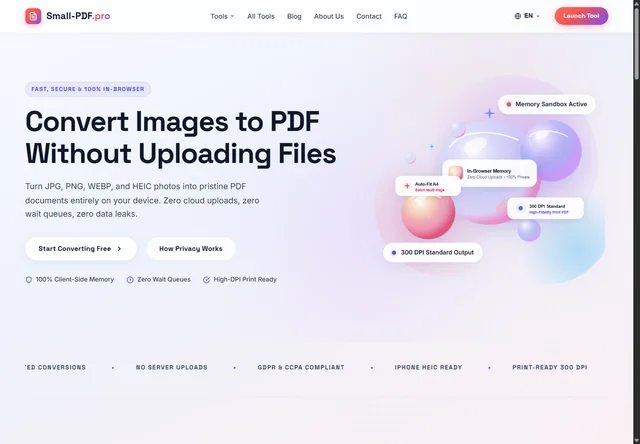
Small-PDF.pro is an independently owned document-tool website. Its homepage leads with image-to-PDF conversion and a route to a workspace, while its directory separates individual image formats and related tasks. The owner and developer is Muzamil Ahad.
The public homepage links “Start Converting Free” to the multi-image converter. This matters for the interface: a visitor can begin with a familiar task instead of having to understand every format-specific utility in the directory. The format routes remain available when someone arrives with a narrower requirement.
The review used public responses and served JavaScript captured on 18 October 2026. It did not use private documents, enter an account or submit a customer record. The current implementation is the subject of the note; delivery dates and historical business results are not inferred.
What was inspected
| Check | Observed evidence | Boundary |
|---|---|---|
| Retrieve the homepage and follow its declared start destination. | Both the homepage and /images-to-pdf return HTTP 200. The start link points to that converter route. | A successful response does not by itself prove the complete conversion workflow. |
| Inspect the converter’s initial HTML and script references. | The page includes a tool container and references the local tool engine, jsPDF and HEIC-conversion assets. | The active file picker and settings are built by JavaScript; their absence from initial HTML is not evidence that the rendered tool has no controls. |
| Read the served tool engine. | It defines file selection, a thumbnail list, page size, orientation, margins, fit controls, progress, error and download states. | Defined code paths are source observations. They are not a browser test of every state. |
Inside the published workflow
The public tool-engine script reads a selected file using FileReader.readAsDataURL, obtains image dimensions and stores an item for the workspace. Its HEIC path uses the referenced converter when that library is available. The thumbnail state tracks each item’s rotation and its position in the selected list.
Generation reads the selected page size, orientation, margins and fit mode. The script creates a jsPDF document, adds pages for subsequent items, draws rotated image data through a canvas and obtains a PDF Blob. The download path uses that generated output. This gives a concrete account of the inspected browser workflow without claiming access to private server code.
No network-upload call was found in the inspected tool-engine script. That is narrower than a claim that the whole website never communicates over the network: the page still requests resources, and a full privacy review would need to examine all scripts, requests and states. The homepage’s broad security, compliance, DPI and format claims were not independently certified by this review.
Decisions that affect the document
The source exposes three page-size choices: A4, US Letter and an image-based automatic size. It separates page orientation from image rotation. This distinction is useful because turning a photograph changes its content orientation, while selecting landscape changes the page onto which that image is placed.
The fit choices also mean different things. The inspected default fit path uses the smaller scale factor so the image stays within the available area. The fill path uses the larger scale factor and can crop content; the original-resolution option follows a different sizing rule. A visitor preparing a receipt or a text-heavy image needs that difference explained before export, not only after noticing a missing edge.
- Selection: show the image count and previews before generation.
- Settings: keep page size, orientation, margins and fit in labelled controls.
- Progress: tell the visitor when images are being read and a document is being assembled.
- Recovery: distinguish a conversion error from a completed file that is ready to download.
These controls are useful implementation evidence. Their existence does not establish keyboard completeness, compatibility with every phone or reliable behaviour for a large batch. Those questions require a defined test set and recorded results.
What the review does not establish
The source observations above do not claim that every advertised format has passed conversion, that a particular document retains a specific print quality, or that a large batch stays within a safe memory budget. File-type selection hints are not the same as comprehensive file validation. Malformed images, oversized inputs, mixed page orientation and output inspection belong in an explicit acceptance plan.
For a comparable project, agree representative input files, the supported formats, limits, output rules and error messages before development. Use synthetic or authorised fixtures during review. The UI and UX scope covers the user journey; custom web development can be scoped around the processing, integration and support requirements that the actual project needs.
Evidence links and review date
Published 19 October 2026. Public responses, interface observations and served files were reviewed on 18 October 2026. Linked websites and scripts can change after that date. This is a current implementation review, with test limits recorded alongside the observations.
Suggest a correction with the page URL and supporting evidence.
Plan your own project
Bring the task, not just a reference image.
Share your public website, the action visitors need to complete and the content you can supply. We can agree the inputs, pages, integrations and acceptance checks before estimating the work.
Talk through your website on WhatsApp ↗