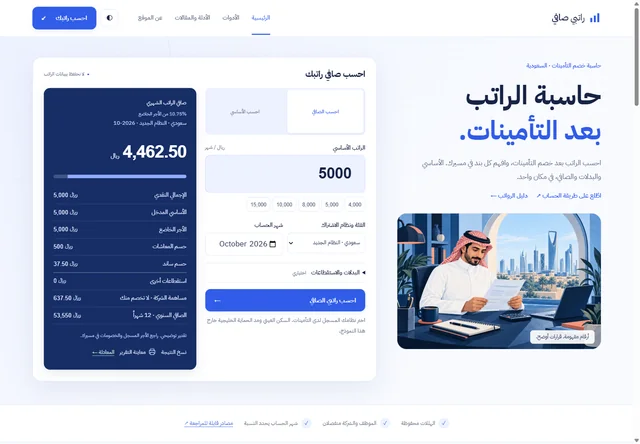
Evidence at a glance
What this review records
A recorded browser check changed the basic salary to 10,000 and displayed 8,925 for the selected October 2026 model. A second check used zero and showed an error instead of the previous result.
- Owner & developer
- Muzamil Ahad
- Project relationship
- Independently owned project
- Focus
- RTL forms · input validation · result presentation
The user task
Ratib Calculator is an independently owned Arabic-language website for a Saudi audience. The homepage brings a basic amount, contribution category, calculation month and optional allowances into one form. A result panel separates the net figure from the amounts used to reach it. Supporting guides and a methodology page sit beside the tool.
The website owner and developer is Muzamil Ahad. This note records the interface as reviewed on 18 October 2026. It does not reconstruct an undocumented development history or present the site as a commissioned payroll-system project.
The design question is practical: can a visitor see which model and month were used, understand the breakdown, and notice when a changed input no longer produces a valid result? Those behaviours can be inspected without supplying anyone’s real salary or subscribing to updates.
Recorded interface checks
The following checks used synthetic amounts in the public calculator. They describe what the interface returned, rather than certifying the underlying regulatory model.
| Action and context | Observed response | What it establishes |
|---|---|---|
| Choose the 10,000 preset. The visible category is the new Saudi model and the month is 2026-10; extra deductions show 0. | The net result becomes 8,925. The breakdown shows 1,000 pension deduction, 75 SANED deduction and a 10.75% employee rate. | The preset changes the result and the interface exposes the selected context and separate deduction rows. |
| Inspect the same result breakdown. | The company contribution is displayed separately as 1,275 and labelled as not deducted from the employee. The annual net row is 107,100. | The interface distinguishes company cost from the employee deduction and labels the 12-month projection. |
| Set the main amount to 0 and activate the calculate button. | The previous result rows disappear. Arabic text asks for a basic salary or desired net amount greater than zero. | An invalid main amount does not leave the earlier successful calculation presented as the current result. |
For the first observed output, 10,000 − 1,000 − 75 = 8,925. That arithmetic explains the displayed breakdown; it is not evidence that the selected category, rates or eligibility apply to a particular person. The month and category remain essential context when discussing a result.
What the public code reveals
The served salary interface script reads the form values, passes an explicit category and calculation date to the engine, and updates the result text. It checks finite, non-negative amounts, requires a positive main amount and rejects months before the interface’s supported July 2024 starting point. Additional deductions that would make the displayed net negative are rejected in the same UI path.
The public calculation engine separates forward and reverse calculations. It rounds monetary outputs to two decimal places and keeps employee deductions and employer cost in separate return fields. A reverse calculation is checked against a forward calculation before the UI accepts the result. These are observable implementation choices; inspecting them is different from validating every formula, rounding boundary or regulatory source.
The UI also recalculates before preparing a report preview or printing. If the current inputs fail, that code prepares an invalid-input message rather than intentionally printing a cached successful result. This report path was inspected in the served source; report preview, clipboard and printing were not exercised in the bounded browser checks above.
Interface decisions worth inspecting
- Explain the state beside the result. The category and month appear with the net amount, rather than only inside the input controls.
- Give optional detail a place. Housing, transport, other allowances and extra deductions are grouped as optional fields instead of being mixed into a single unexplained amount.
- Keep invalid and successful states separate. The zero-value check shows why removing a stale result matters as much as displaying an error.
- Make the calculation inspectable. The public methodology page is linked from the calculator; the review’s direct request to that page returned HTTP 200.
Scope and next checks
This is a dated public-interface and published-code review. It does not certify payroll law, determine a user’s registered insurance category, audit the entire site’s network activity or prove a privacy/compliance claim. No real payroll data was entered. The separate newsletter form was not submitted.
A fuller acceptance plan would cover category changes, dates around model boundaries, allowance combinations, reverse-calculation limits, keyboard operation, copy/print output and comparison with independently approved reference cases. Each result should record the selected model and date. Those checks require their own evidence; they are not implied by the two browser interactions recorded here.
For a business tool, the same approach helps define a useful brief: identify the authoritative rules, the permitted inputs, the result explanation and the invalid states before choosing the page layout. See the custom web development scope and multilingual interface planning for related work.
Evidence links and review date
Published 19 October 2026. Public responses, interface observations and served files were reviewed on 18 October 2026. Linked websites and scripts can change after that date. This is a current implementation review, with test limits recorded alongside the observations.
- Working calculator ↗
- Published methodology ↗
- Public interface script reviewed ↗
- Public engine reviewed ↗
Suggest a correction with the page URL and supporting evidence.
Plan your own project
Bring the task, not just a reference image.
Share your public website, the action visitors need to complete and the content you can supply. We can agree the inputs, pages, integrations and acceptance checks before estimating the work.
Talk through your website on WhatsApp ↗